

Transform Your Website: Key Design Fixes to Drive Traffic and Boost Conversions
To survive in this highly competitive market, you need a storefront for your business is your website. It’s often the first interaction potential clients have with your brand, and first impressions count. Within seconds of landing on your page, visitors form judgments that can make or break potential conversions. Yet despite the critical importance of web design, many businesses fall into predictable traps that sabotage their online success. Our developers at Matrix Media Solutions have analyzed hundreds of websites and identified the recurring mistakes that cost businesses traffic, leads, and revenue. More importantly, we’ve developed proven strategies to avoid these pitfalls.
Here are the ten most common web design mistakes we encounter and the actionable solutions that can transform your digital presence.
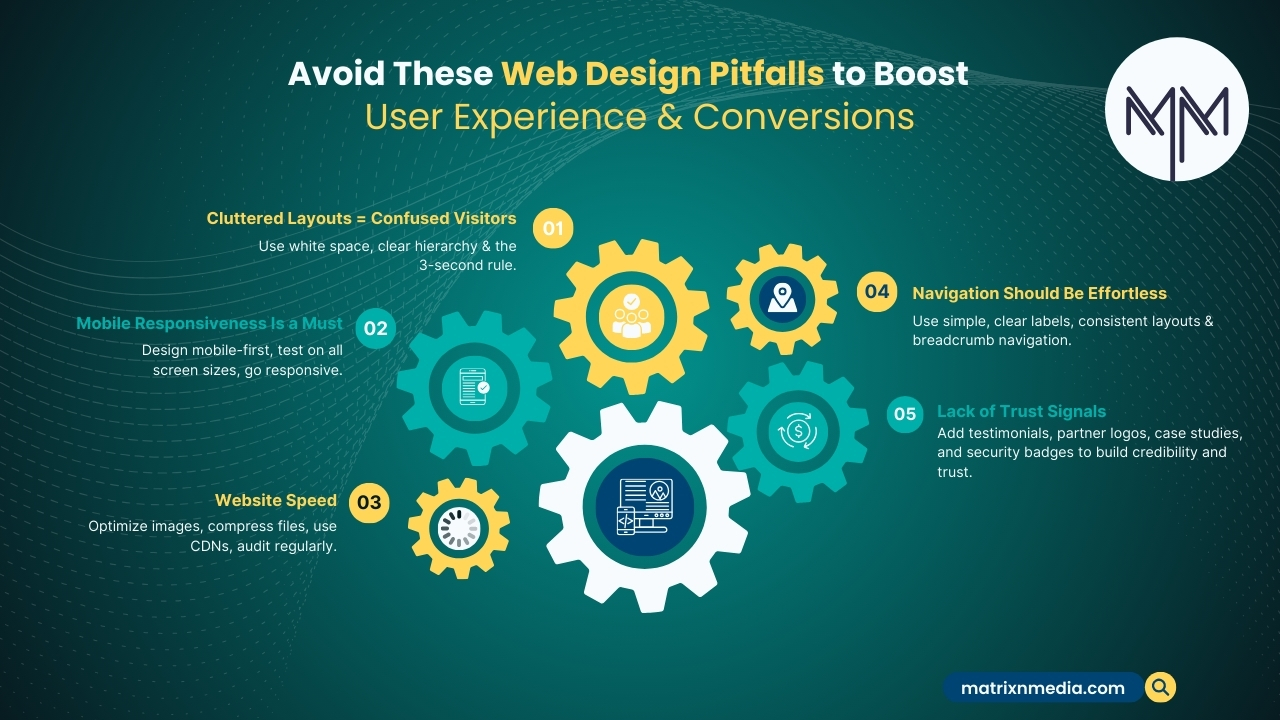
1. Overwhelming Users with Cluttered Layouts
The Mistake: Cramming every piece of information onto a single page creates visual chaos that overwhelms visitors. When users can’t quickly identify what they’re looking for, they leave.
The Solution: Utilize white space as your ally. Create clear visual hierarchies using typography, spacing, and strategic placement of elements. Follow the “three-second rule” – users should understand your primary message within three seconds of arrival. Use clean layouts with plenty of breathing room between sections, and resist the urge to fill every pixel with content.
2. Ignoring Mobile Responsiveness
The Mistake: With more than half of all online traffic coming from mobile devices, non-responsive designs turn off half of your prospective customers. Users have a terrible experience when websites don’t adjust to mobile screens.
The Solution: Implement mobile-first design principles. Start designing for the smallest screen size and scale up. Make use of touch-friendly navigation elements, scalable pictures, and adaptable grid systems. Regularly test your website on a variety of screens and devices. Consider Progressive Web App (PWA) features for enhanced mobile experiences.
3. Sacrificing Speed for Aesthetics
The Mistake: Heavy images, complex animations, and bloated code create beautiful websites that take forever to load. Users expect pages to load within two seconds – anything longer triggers abandonment.
The Solution: Optimize images using modern formats like WebP, compress files without losing quality, and implement lazy loading for below-the-fold content. Minimize HTTP requests by combining CSS and JavaScript files. Use Content Delivery Networks (CDNs) to serve content from servers closest to your users. Regularly audit your site’s performance using tools like Google PageSpeed Insights.
4. Creating Confusing Navigation Systems
The Mistake: Complex menus, unclear labels, and inconsistent navigation patterns leave users lost and frustrated. When visitors can’t find what they need, they seek solutions elsewhere.
The Solution: Design intuitive navigation that follows conventional patterns. Use clear, descriptive labels for menu items and maintain consistency across all pages. Implement breadcrumb navigation for deeper site sections and include a search function for content-heavy sites. Conduct user testing to identify navigation pain points and refine accordingly.
5. Neglecting Search Engine Optimization
The Mistake: Building visually stunning websites that search engines can’t understand or index properly limits organic visibility and traffic potential.
The Solution: Integrate SEO best practices from the design phase. Use semantic HTML markup, optimize meta titles and descriptions, and ensure proper heading hierarchy. Create XML sitemaps, implement schema markup, and optimize images with descriptive alt text. Focus on Core Web Vitals and technical SEO elements that impact search rankings.
6. Implementing Poor Color Contrast
The Mistake: Low contrast between text and background colors creates accessibility barriers and reduces readability for all users, not just those with visual impairments.
The Solution: A minimum contrast ratio of 4.5:1 for regular text and 3:1 for large type should be adhered to per WCAG accessibility criteria. Use tools like WebAIM’s contrast checker to verify color combinations. Consider color blindness when choosing palettes and never rely solely on color to convey important information. Test your design across a range of devices and lighting scenarios.
7. Overcomplicating Forms and Calls-to-Action
The Mistake: Lengthy forms with unnecessary fields and weak calls-to-action create friction that prevents conversions. Every additional field reduces completion rates.
The Solution: Streamline forms to collect only essential information. Use progressive profiling to gather additional data over time. Make calls-to-action visually prominent with contrasting colors and compelling copy. Position them strategically throughout your site and use action-oriented language that creates urgency. To maximise performance, run A/B tests on various CTA variations.
8. Inconsistent Branding and Visual Identity
The Mistake: Mixing fonts, colors, and styles creates a disjointed brand experience that undermines credibility and professional appearance.
The Solution: Develop comprehensive brand guidelines that dictate typography, color palettes, imagery styles, and voice. Make a style guide to guarantee uniformity in all design components. Use a clear hierarchy and no more than two font families. Maintain consistent spacing, button styles, and visual elements throughout your site.
9. Failing to Optimize for Conversions
The Mistake: Designing without clear conversion goals leads to beautiful websites that don’t drive business results. Every page should have a purpose beyond aesthetics.
The Solution: Define specific conversion goals for each page and design accordingly. Use heat mapping and user behavior analytics to identify optimization opportunities. Implement social proof elements like testimonials and trust badges. Create compelling value propositions that communicate benefits. Use scarcity and urgency tactics appropriately to encourage action.
10. Neglecting User Testing and Feedback
The Mistake: Assuming designers and developers represent typical users leads to interfaces that work for creators but confuse actual visitors.
The Solution: Conduct regular user testing with real target audience members. Use tools like Hotjar or Crazy Egg to understand user behavior patterns. Implement feedback mechanisms and actively seek user input. Create user personas based on actual data and design for specific user journeys. Iterate continuously using analytics data and user input.

Moving Forward: Your Path to Better Web Design
Avoiding these common mistakes requires planning, user-focused thinking, and ongoing optimization. At Matrix Media Solutions, we’ve helped countless businesses transform their digital presence by addressing these fundamental issues.Remember that great web design is about creating meaningful experiences that serve your users while achieving your business objectives. Start by auditing your current website against these ten areas, prioritize the most critical issues, and implement changes systematically.
Your website is often the first impression potential customers have of your business. Make it count by avoiding these costly mistakes and creating digital experiences that convert visitors into loyal customers.
Ready to transform your web presence?
Contact Matrix Media Solutions today to discover how we can help you avoid these mistakes and create a website that drives real business results!